
Return Request
A customer may request a product(s) return for many reasons. The most common valid reasons for returns include receiving an incorrect size or product, receiving a product that doesn’t match the description, receiving a product that doesn’t meet expectations, making returns during the holiday season, and receiving a damaged product.
ZenBasket allows you(the store owner) to view and process the return request.
How to View and Process Return Request?
-
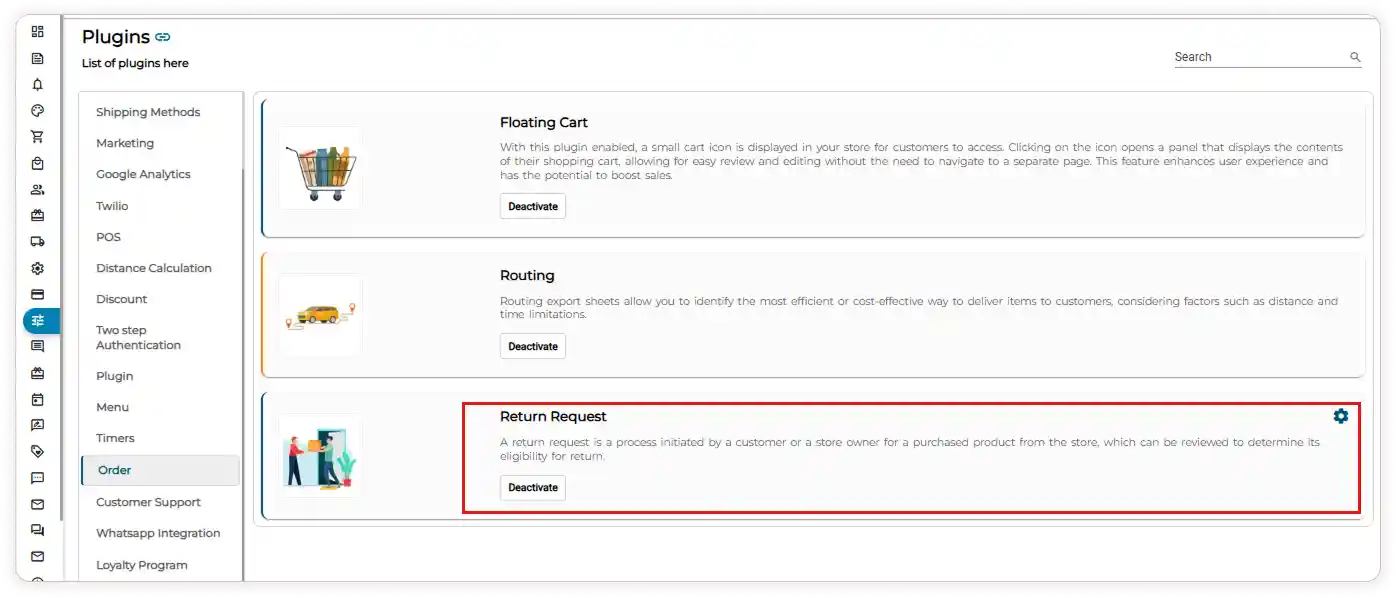
Go to the Plugins menu and select the Order plugin from the list.
-
Activate the Return Request plugin.
-
Click the Setup icon, enter the return days, and click Save.
Note : Products with the Return for this product option enabled will display the return date on the storefront.

-
Scroll to the bottom of the order page to see the return request products.
-
Click the View icon to view detailed product return information (e.g., product name, return quantity, return status, return action, return reason, and date).
-
Use the down arrow near each product to change the Return Status (approve, decline, or initiate the return process).

-
To Restore the product stock(Restore the product stock option is only available once the status is changed to Returned after approval), click the Refresh icon.

-
You can use the Filter icon to filter the list by Status (Automatic return, Declined, Pending, Approved, Returned) or a custom date.

Video Tutorial